Log 003 — Oct 25, 2026
SLOOP and X0X, running on the Studio
Studio v1.4 and v1.5 run SLOOP and X0X on the Studio itself, played from an FM-1. Pocket v2.9 connects to Bluetooth MIDI keyboards.
Two Studio releases in a day. The Studio now runs two FM-1 firmwares itself, on its own screen, played from a real FM-1: SLOOP in v1.4 and X0X in v1.5.
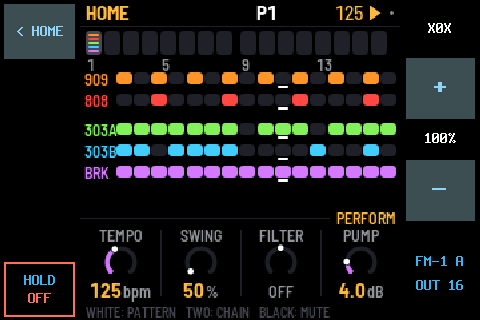
Not emulated: their own code
SLOOP (isod89) and X0X (Charles Vestal’s groovebox: a 909, an 808, two 303s with TB-3PO, a breakbeat player and song mode) run on the Studio as their own sound engines, sequencers and screens, compiled for its Raspberry Pi. On one of the Pi 3’s four cores, SLOOP’s heaviest test takes about 8%, and X0X about 20%.
Played from your FM-1
FM-1 A runs SLOOP Remote Out: SLOOP with a REMOTE OUT that sends its 14 buttons, 7 knobs and 27 keys over MIDI. The Studio passes them to whichever app is running, so every control does what it does on an FM-1 running that firmware. As of v1.5 it sends every knob turn on every page, plus MASTER.
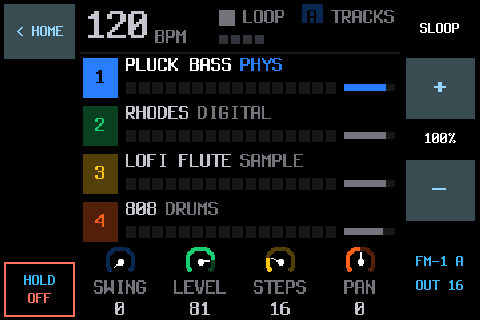
MORE › PLAY SLOOP or PLAY X0X starts one. One runs at a time, and each has its own level in the MIXER. < HOME goes back to the Companion with it still playing; HOLD OFF saves and stops it. SLOOP’s working project and X0X’s save are kept and loaded when they start.
v1.5 also fixes the recorder’s clip warning, which used to flag an 808’s deep sub-bass as clipping.
Pocket v2.9: Bluetooth MIDI keyboards
The Pocket (and the Studio) can now connect to Bluetooth MIDI keyboards that wait to be connected to, like a microKEY Air or a WIDI, and take several Bluetooth MIDI devices at once. It’s built with automated tests, but it hasn’t been tried with a real keyboard yet.
What’s been tried for real
On the real Studio: SLOOP played from FM-1 A; X0X opened and played by hand; and stress tests of X0X alone and next to SLOOP, driven by a script and recorded by the Studio, with no gaps in the sound. Not yet: X0X’s song mode and some of its controls, switching straight from one app to the other, and the sampler and DAW tab. The full list is in the Companion’s README.
SLOOP and X0X on the Studio each install from their own repo: SLOOP Remote Out and X0X for the FM-1 Companion Studio.