002 / Hardware
FM-1 Companion Studio
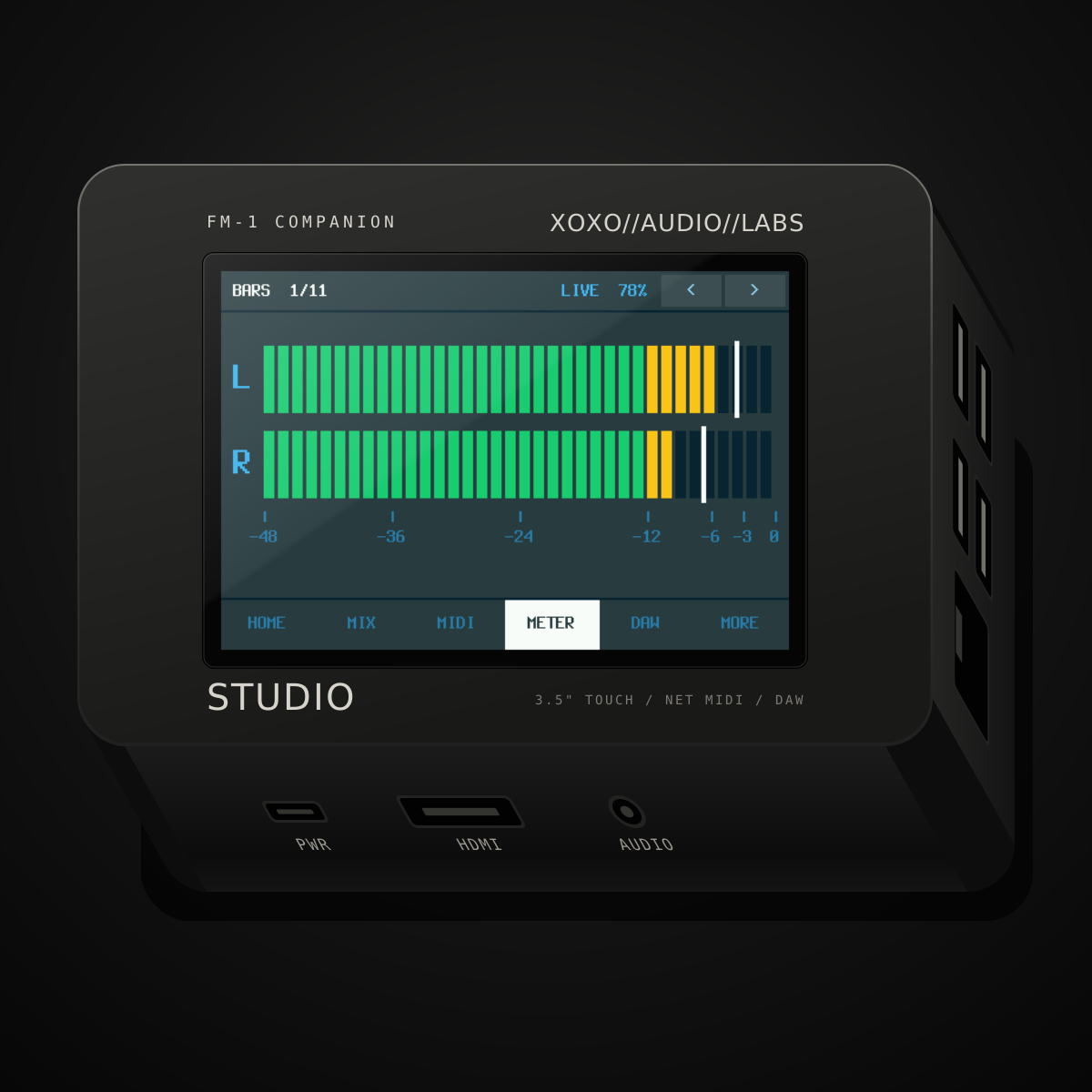
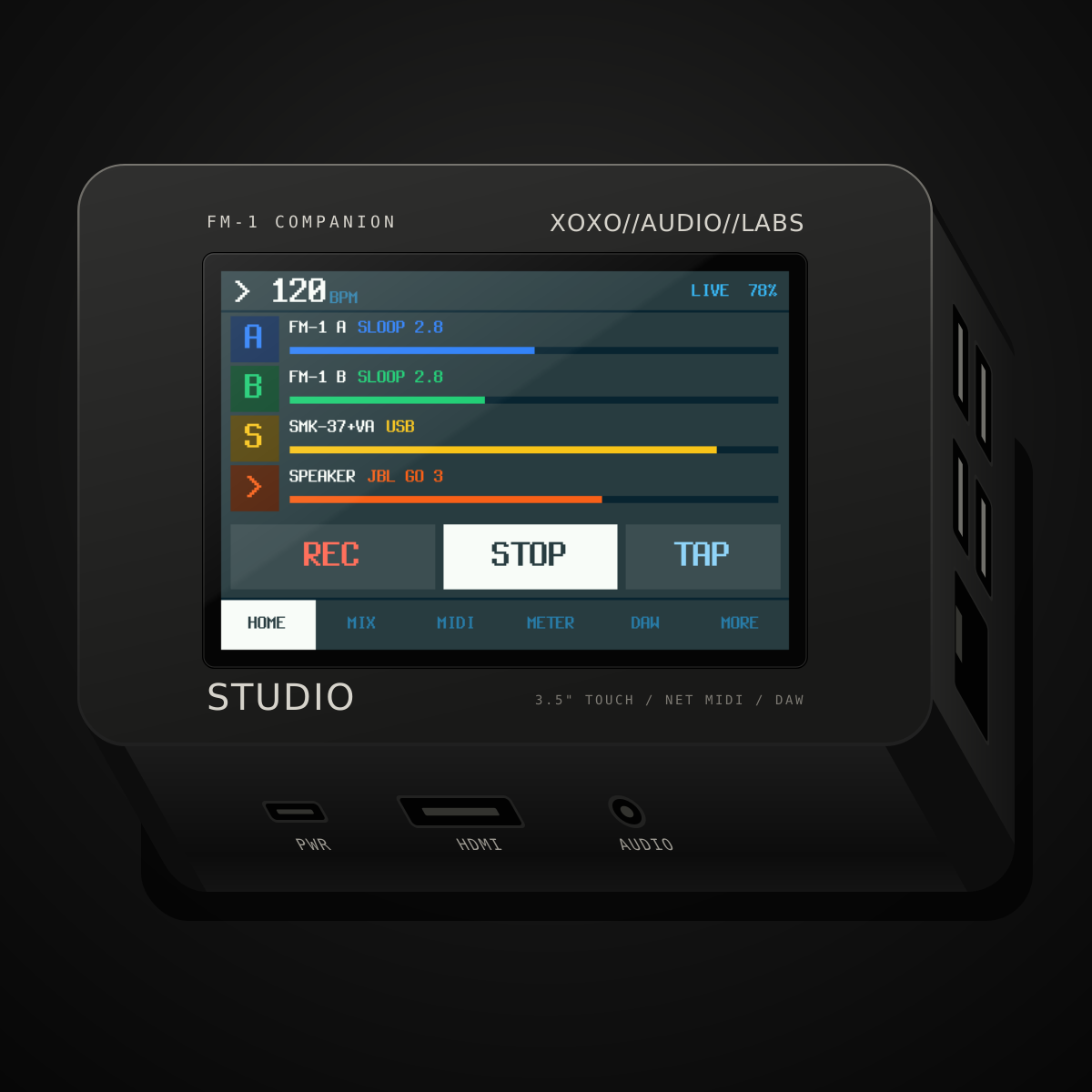
The Companion with a 3.5" touchscreen and two DJ decks, played from a Hercules controller. It runs SLOOP and X0X itself, played from your FM-1. Plus a sampler, a recorder, headphones with DJ-style cue and a DAW control surface.
- Computer
- Raspberry Pi 3 B+
- Screen
- 3.5" touchscreen, 480×320
- Power
- PiSugar 3 Plus, 5000 mAh
- Ports
- 4× USB, Ethernet, HDMI, 3.5 mm audio
- DJ
- Two decks, played from a Hercules DJControl Inpulse 200 MK2 and the touchscreen; reads Serato's BPM, key, beatgrids and hot cues from MP3s
- Apps
- SLOOP and X0X running on the Studio, together on one clock, played from an FM-1 (SLOOP Remote Out)
- Sampler
- 16 pads, SLOOP's sequencer (64 steps), 16 punch-in FX
- Expansion
- Card slot planned (first card: MIDI, 5 TRS jacks)
- DAW
- Network MIDI (RTP-MIDI), Mackie Control for Kraken (Ableton Live: untested)
- Audio
- Any class-compliant USB audio device, each on its own mixer channel; 3.5 mm jack with cue
- Look
- SLOOP's palettes and pixel font, follows the FM-1's colors
- Software
- Studio v1.6, GPL-3.0
The Studio is the second build of the FM-1 Companion. It runs the same software as the Pocket: Bluetooth audio and MIDI, the mixer, recording, the MIDI matrix, the library and the web app. Every screen is redrawn for touch, in the style of SLOOP.
Open source, on real hardware. The Studio has run on its real hardware since October 2026: a Pi 3 B+, the 3.5” touchscreen and a PiSugar 3 Plus, with two FM-1s, an SMK-37 and a K.O. Sidekick on its USB ports. The case is next.
The Studio tour (v1.3, 1:12, with sound): the Studio’s own screens, drawn by its code on a computer with each tap shown, not filmed. The music is real: two FM-1s and an SMK-37 played over MIDI, recorded by the Studio.
New in v1.6: DJ decks
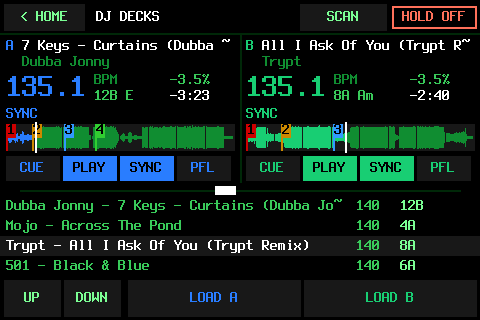
MORE › DJ DECKS turns the Studio into two DJ decks, played from a Hercules DJControl Inpulse 200 MK2 (the controller they were made and tried with) and from the touchscreen.
- Your music, scanned. Put tracks in the Studio DJ Music folder (MP3, FLAC, WAV, AIFF or Ogg) and tap SCAN. It reads each track’s title, artist, BPM, key (in Camelot too) and beatgrid from its tags, including what Serato DJ saved in your MP3s: BPM, key, beatgrid and hot cues. Where the tags don’t have them, it works out the BPM, key and beat from the sound. Checked against Serato’s own analysis of 37 tracks, it found the same BPM on 32 (36 counting double or half tempo) and the same key on 26.
- Two real decks. CUE as on a CDJ, a ±8 % tempo fader, the jog wheel to nudge, search or scratch, four hot cues, loops you can halve or double, loop rolls, gain, low and high EQ, a filter, the channel faders and the crossfader.
- SYNC that holds the beat. A synced deck locks to the other’s tempo and beat while both play, at double or half tempo when that’s nearer (a 70 BPM track locks to one at 140). Each track’s beatgrid is lined up with its own kicks when it loads.
- Cue in your headphones. The master plays on the Studio’s Bluetooth speaker, and PFL goes to the Hercules’s own headphone out.
- It remembers. Hot cues and cue points are kept per track (in a file beside your music: the music files and their Serato tags are never changed), and the decks come back loaded and paused where you left them.
- Made for the screen. Both decks’ waveforms with their hot cues (tap one to jump there), BPM, key and time left, plus the track list with LOAD A and LOAD B.
All of this has been played by hand on the real Studio with the Hercules. Both decks playing take about 45 % of one of the Pi 3’s cores. Not built yet: the FX and SAMPLER pad modes, key lock (a faster track sounds higher), and the decks as a MIXER channel or in the recorder. Not affiliated with Serato or Hercules.
SLOOP and X0X on the Studio (v1.4 to v1.6)
The Studio runs two FM-1 firmwares itself, on its own screen. They aren’t emulated: it’s their own engines, sequencers and screens, compiled for the Studio’s Pi.
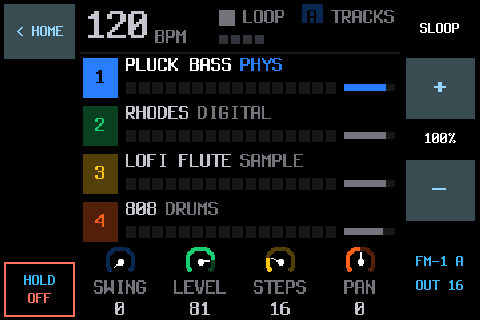
- SLOOP (v1.4), isod89’s firmware for the FM-1.
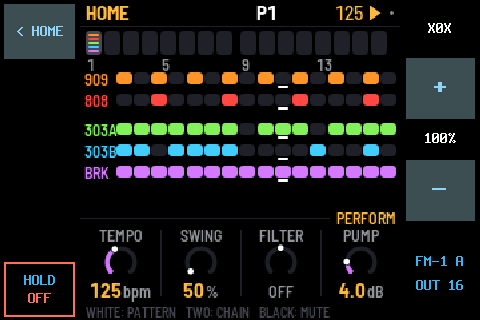
- X0X (v1.5), Charles Vestal’s groovebox: a 909, an 808, two 303s with TB-3PO, a breakbeat player and song mode.
- Played from a real FM-1. FM-1 A runs SLOOP Remote Out, SLOOP with a REMOTE OUT that sends its keys, buttons and all seven knobs over MIDI. Every control does what it does on an FM-1 running that firmware.
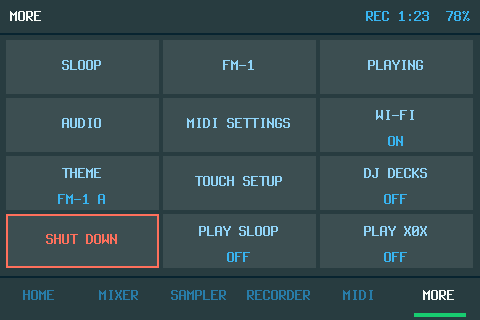
- MORE › PLAY SLOOP or PLAY X0X starts one, and each gets its own level and CUE button in the MIXER. < HOME goes back to the Companion with it still playing; HOLD OFF saves and stops it.
- Both at once, in time (v1.6). One is on the screen while the other plays behind it, on one MIDI clock: SLOOP leads by default, so PLAY on SLOOP starts both from the top. Tried by hand from FM-1 A, with SLOOP leading.
- They keep their work. As of v1.6 the Studio’s SLOOP keeps everything an FM-1’s SLOOP keeps (projects,
slots, presets, samples), and the Companion backs it up and restores it as it does an FM-1. A backup of a real
FM-1 restores onto the Studio’s SLOOP. X0X backs up to its own
.x0bformat. The backups have been tested by script on the Studio, not yet by hand. - A smarter clip warning: the recorder no longer flags an 808’s deep sub-bass as clipping.
Each has its own repo with setup steps: SLOOP Remote Out and X0X for the FM-1 Companion Studio.
What the Studio adds
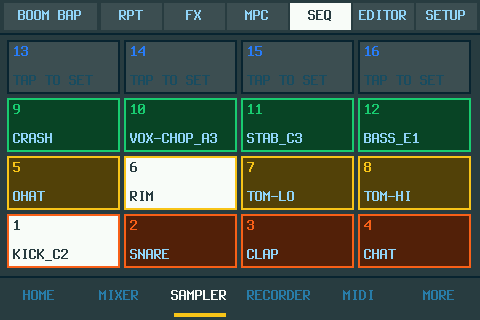
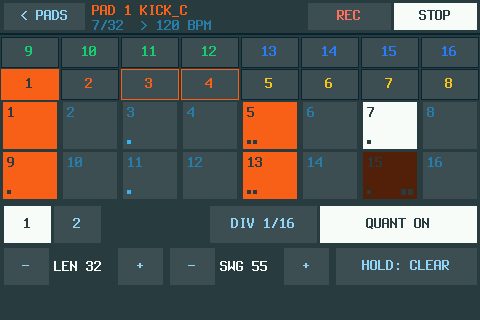
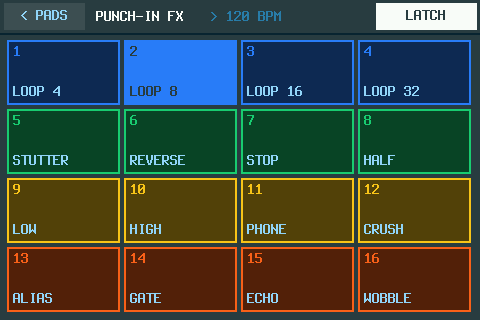
- A sampler. 16 pads in kits, laid out like an MPC’s or like SLOOP’s drum track. Sample any source onto a pad, trim it in the touch sample editor and play it from the screen or any MIDI keyboard. SLOOP’s drum sequencer runs the pads with no other hardware: up to 64 steps, swing, ratchets, nudge and live recording. Plus note repeat and 16 of SLOOP’s punch-in FX (loops, stutter, reverse, tape stop, filters, crush, echo).
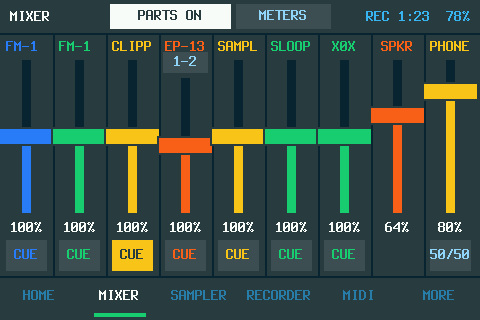
- Headphones, like a DJ mixer. The 3.5 mm jack is a second output with no Bluetooth delay. Each source has a CUE button, heard on the jack before its fader, with a cue/main blend.
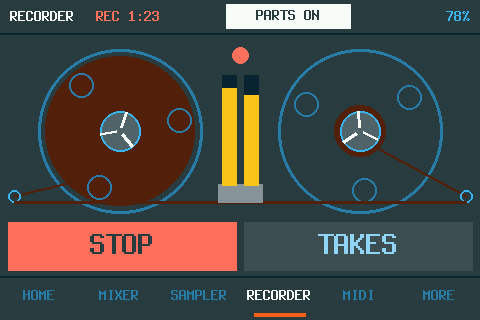
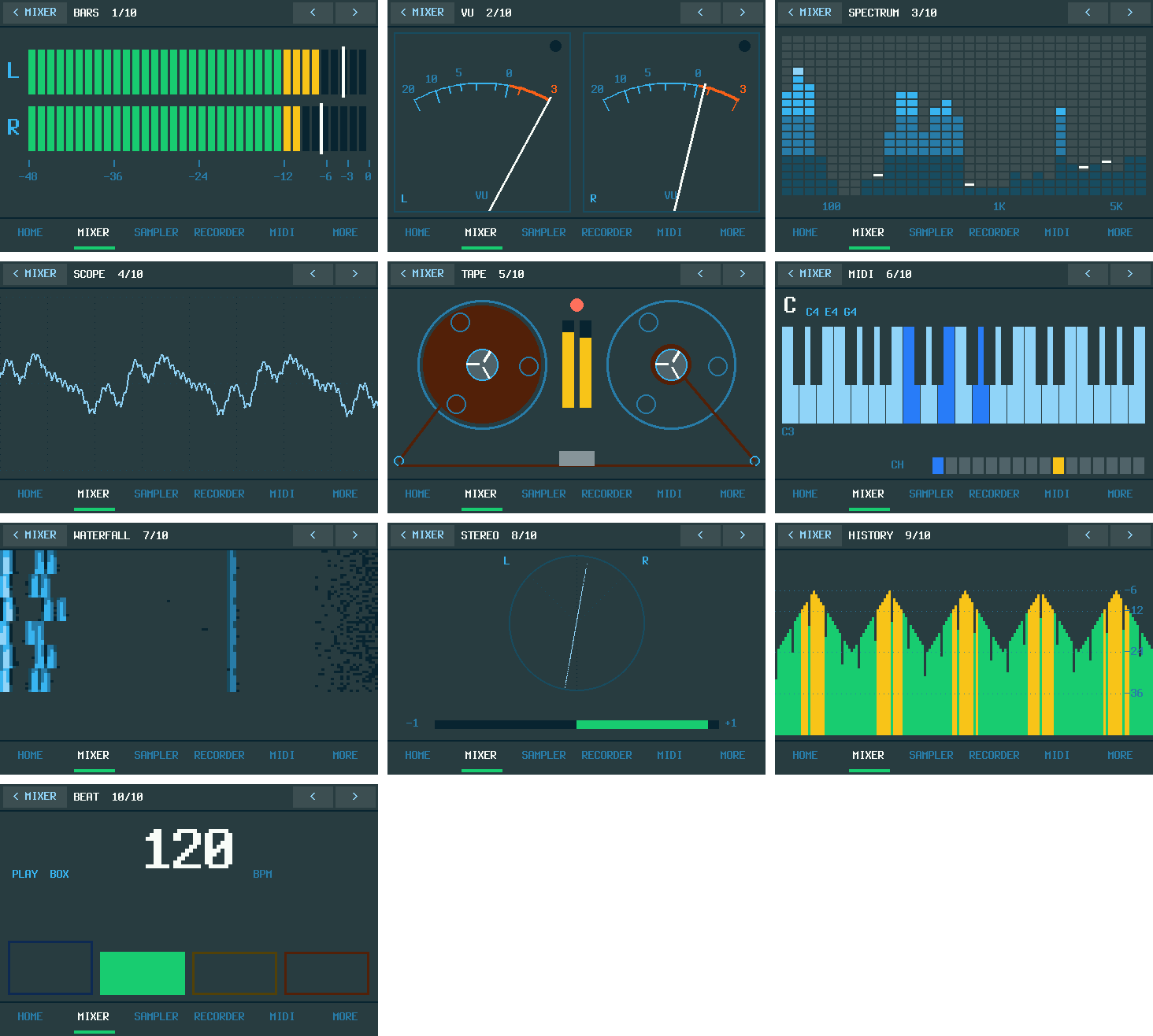
- A recorder. Its own tab with the reel-to-reel deck: record the mix, or each source as its own part.
- A touchscreen made for it. Tabs along the bottom: HOME, MIXER, SAMPLER, RECORDER, MIDI and MORE. Settings and lists are big rows you tap. Anything that writes to the FM-1 (a restore, a firmware install) asks you to hold a button to confirm.
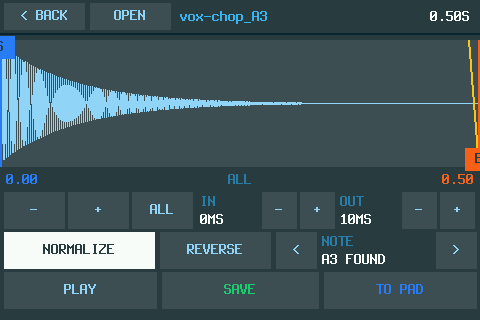
- The sample editor, by touch. Drag the start and end markers with a finger, zoom in around the selection, fade, normalize, reverse, set the note, play and save.
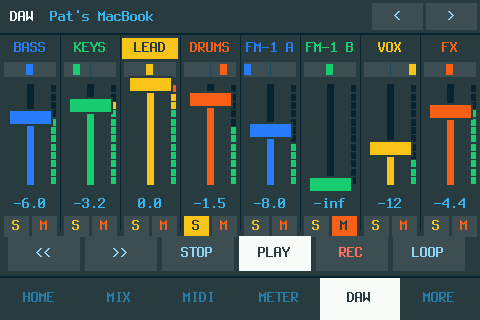
- Plays with your DAW. The Studio is a network MIDI device, so a DAW can play both FM-1s and your USB synths, send them clock and record what they play. The DAW tab is a Mackie Control surface for Kraken: 8 touch faders with track names, meters, pan, solo, mute and the transport. Ableton Live’s Mackie Control should work too, but it hasn’t been tried yet.
- Four USB ports, all at once. Each USB audio device gets its own named mixer channel (a keyboard’s synth, a K.O. Sidekick, a USB mic), and each USB MIDI device its own row and column in the MIDI routes.
- Bluetooth MIDI keyboards (new, shared with Pocket v2.9): it also connects to keyboards that wait to be connected to, like a microKEY Air or a WIDI, and takes several Bluetooth MIDI devices at once.
- Your FM-1’s colors. It reads the FM-1’s SLOOP color theme over USB and matches it, or you pick one of SLOOP’s five palettes.
- Expansion cards (planned). A card slot with a defined pin map and a card ID, so the box will know which card is in. First up: a MIDI card with five TRS jacks (IN A, OUT A, THRU A, IN B, OUT B).
Tried on the real Studio, and not yet
Everything here is built and has automated tests. This is what has also been seen working on the real box.
- Tried: the touchscreen and the PiSugar 3 Plus; four USB devices at once, each routed on its own; recording two FM-1s and an SMK-37; the recorder; the headphone jack with CUE; Bluetooth audio to a JBL Go 3; SLOOP on the Studio, played from FM-1 A; X0X opened and played by hand, plus stress tests of X0X alone and next to SLOOP with no dropouts; SLOOP and X0X playing together on one clock; the DJ decks with the Hercules (scan, sync, cues, loops, rolls, EQ, filter, jog, PFL, the lights).
- Not yet: the sampler (pads, the sequencer, note repeat and FX); the DAW tab with Kraken or Ableton Live; connecting to a real Bluetooth MIDI keyboard; X0X’s song mode and some of its controls; the backups of SLOOP and X0X by hand; the DJ decks without the Hercules, over a long set, or next to SLOOP or X0X; the HDMI mirror; the web app on the real box.
The full, current list is in the Companion’s README.
Build one
Same repo, same installer: it detects which build it’s running on. Parts: a Raspberry Pi 3 B+, the common 3.5” 480×320 SPI touchscreen, a PiSugar 3 Plus and a microSD card. SLOOP and X0X on the Studio each install from their own repo. The DJ decks are made for the Hercules DJControl Inpulse 200 MK2. Everything is on GitHub.